How to Put a Birthday Message on a Stadium Big Screen
Learn how to put any birthday message on a massive arena jumbotron in 60s. Create an authentic stadium big screen video greeting with MakeMyMsg.
How to Put a Birthday Message on a Stadium Big Screen: The Ultimate Arena Surprise
For sports enthusiasts, concert lovers, and spectacle seekers, seeing their own name up in lights on a towering arena jumbotron is an unforgettable thrill. Every year, millions of fans attending NFL, NBA, Premier League, or baseball games crane their necks toward the central scoreboard during halftime, hoping to spot a birthday shoutout or marriage proposal.
- However, securing a real scoreboard message during a live sporting event is notoriously difficult. Major league stadiums often charge between $250 and $1,500 for a 15-second message slot, require bookings weeks in advance, and limit announcements to tiny, hard-to-read text scrolls that are easily missed. With MakeMyMsg's Stadium Big Screen Template, you can generate a photorealistic, full-screen arena jumbotron video greeting in under 60 seconds—completely free, ready to send directly to your friend's phone on WhatsApp or Instagram.
Anatomy of an Authentic Arena Jumbotron Video
What makes MakeMyMsg's stadium simulation look so realistic? Our 3D artists and motion engineers meticulously calibrated several key visual layers:
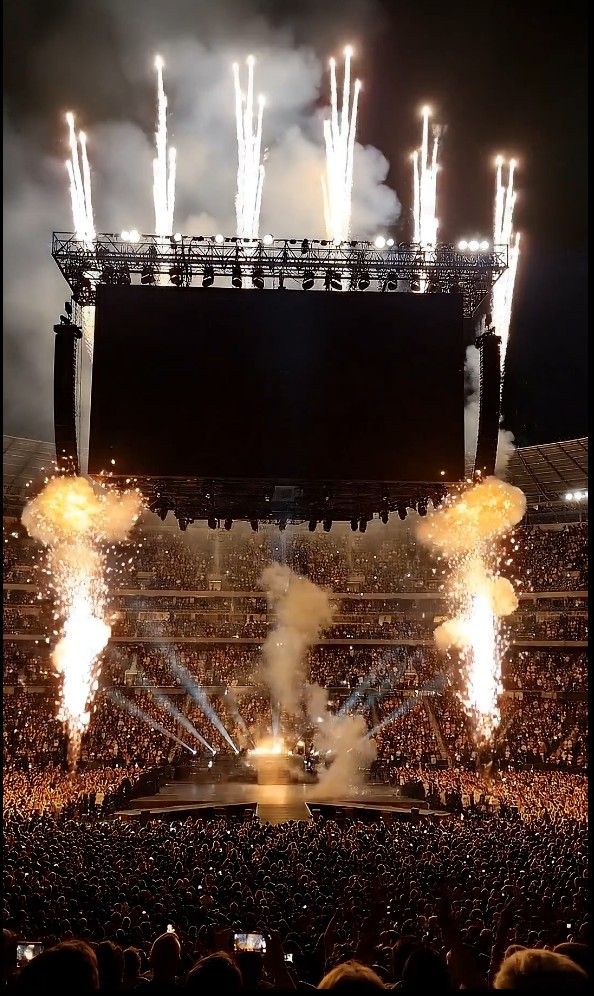
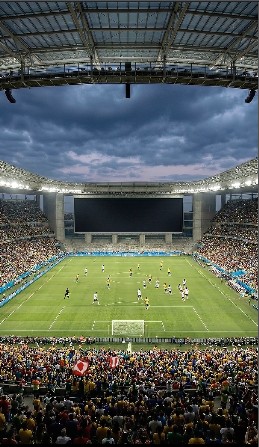
1. 3D Stadium Architecture: The scene places the camera directly inside a packed 70,000-seat arena bowl, complete with tiers of seating, stadium floodlights cutting through evening atmospheric haze, and subtle crowd animation.
2. Authentic LED Pixel Simulation: Real stadium screens are composed of individual RGB LED clusters that exhibit a subtle grid texture and blooming glow. Our shader replicates this exact LED pixelation, ensuring the text looks broadcast-ready rather than overlaid with basic graphic design software.
3. Immersive Audio Design: The video is synchronized with the roaring applause of tens of thousands of cheering fans, recreating the exact acoustic environment of a packed stadium celebration.
The 10-Character Focus: Crafting Your Message
- Engineered for high-impact visual punch, our Stadium Big Screen Template supports up to 10 characters. This ensures the 3D typography maintains crisp proportions, volumetric lighting, and balanced margins across the arena screen. Here are creative ideas that look phenomenal on the jumbotron:
• Milestone Celebrations: 'HAPPY 21ST' (10 chars) • Athletic Shoutouts: 'CHAMPS 26' (9 chars) • Personal Dedications: 'MVP FOREVER' (10 chars) • Big League Welcome: 'BIG LEAGUES' (10 chars)
How to Deliver the Surprise for Maximum Impact
To pull off an unforgettable birthday surprise, timing is everything. Because MakeMyMsg outputs an ultra-high-definition vertical 1080×1920 MP4 file, it renders in full-screen brilliance on mobile devices. Send it precisely at midnight via WhatsApp, post it on their Instagram Story with their favorite team anthem, or cast it onto the living room TV during their birthday party. It delivers the grandeur of a $1,000 arena scoreboard at zero cost in under 60 seconds.
Create your personalized Stadium Big Screen video right now on MakeMyMsg!
How to Format a Name So It Pops on the Jumbotron
- On a bright sports arena display like [Stadium Big Screen](/templates/stadium_big_screen), clean letter spacing makes the difference between a crisp reveal and a crowded frame. MakeMyMsg templates accept a single custom text input of up to 10 characters. A single first name (`David`, `Priya`), a short milestone (`Happy 21!`), or a tight title (`Best Dad`, `Coach Sam`) fills the display cleanly with strong contrast.
- Before starting your ~60-second render, check the live preview for accidental trailing spaces or all-caps strings that look overly wide. Remember that MakeMyMsg keeps the camera movement, crowd lighting, and audio fixed per template so every 1080x1920 vertical HD MP4 exports with consistent visual balance.
Other Arena and Celebration Templates Worth Considering
- If the birthday person loves fireworks or championship celebrations, compare Stadium Big Screen in [Premium](/templates/premium) with [Stadium Fireworks](/templates/stadium_fireworks) and [Stadium Celebration](/templates/stadium_celebration) in [Cinematic Templates](/templates/cinematic-templates). For a funnier group-chat reaction, [The Unexpected Arrival](/templates/the_unexpected_arrival) in [Signature](/templates/signature) is a popular alternative.
Once your MP4 finishes rendering, share it directly to WhatsApp, Instagram Stories, or a family group chat alongside your written birthday note. You can also explore more ideas on our [Birthday Video Messages](/use-cases/birthday-video-messages) page or check [How It Works](/how-it-works).
Common Stadium Video Mistakes and Quick Fixes
The most frequent mistake is typing a long full name or multi-word sentence that exceeds 10 characters. Stick to the recipient's first name (`Lucas`, `Ananya`), a sports nickname (`Cap`, `MVP Sam`), or an age milestone (`Happy 30!`). Another mistake is screen-recording the preview instead of downloading the rendered 1080x1920 MP4 — screen recordings blur the stadium LED glow and drop frame rate. Always download the finished HD file directly after the ~60-second render, and upload it straight from your phone gallery so the jumbotron reveal looks crisp on every screen.
- Keep in mind that MakeMyMsg is a structured template platform across 24 active scenes and 8 collections, not a custom timeline editor. That structure is exactly why your text stays centered and legible inside the stadium lighting every time.